The platform · self-serve booking · updated June 2026

Pick the screen. Pick the hour. See the price.

Blindspot puts 3 million digital billboards on one map and lets you book them like inventory, not mystery: exact screens, exact hours, every price on the card before you commit. You don't buy audience averages — you buy actual location and time. Nobody else does this, and definitely not at this scale.

0M+

screens on one self-serve map, in 50+ countries

$0

average price per play on a Miami urban panel — visible before you book

0%+

budget saved vs a traditional OOH or pDOOH buy, by skipping empty hours

0

steps from naming a campaign to publishing it

What you're actually buying

Not CPMs. Corners of the world.

CPM flattens context, and context is the entire point of this channel. A screen outside a gym at 7 AM and one under a highway at 3 AM can price identically per thousand — and have nothing in common commercially. Blindspot sells the thing that actually matters: a specific place, at a specific hour.

  • The exact hours, on any connected screen. An hourly grid per screen — book the commute, skip the 3 AM raccoon shift. No one else offers this at scale.
  • A schedule per screen, in one plan. Each screen keeps its own hours and plays-per-hour, matched to its location and facing direction — proper content distribution, not spray-and-pray.
  • Creative that reacts to the street. Rules per creative, per screen: weather, day, or any API data — air quality, stock prices, live scores.
When plans buy time + place, not CPMMeasured vs control
Incremental store visit$0.82 each
Incremental website visit$0.80 each
Incremental online purchase$5.75 each
Paid social, same purchases$15–40 typical CPA
SourceBlindspot campaign data, The Drum (2026)

How it works

A campaign in six steps

From naming the campaign to publishing it — every screenshot below is the live product, booking real Miami screens.

Step 01 · The setup

Name it, date it, pick your pilot

First choice: drive yourself with HyperLocal (manual planning) or hand the keys to the Blinky AI Planner. This page walks the manual route — Blinky has a page of its own.

Then the basics: a campaign name (brand + market + month is the convention that keeps reporting sane), the brand's industry, and a start date. Hit continue.
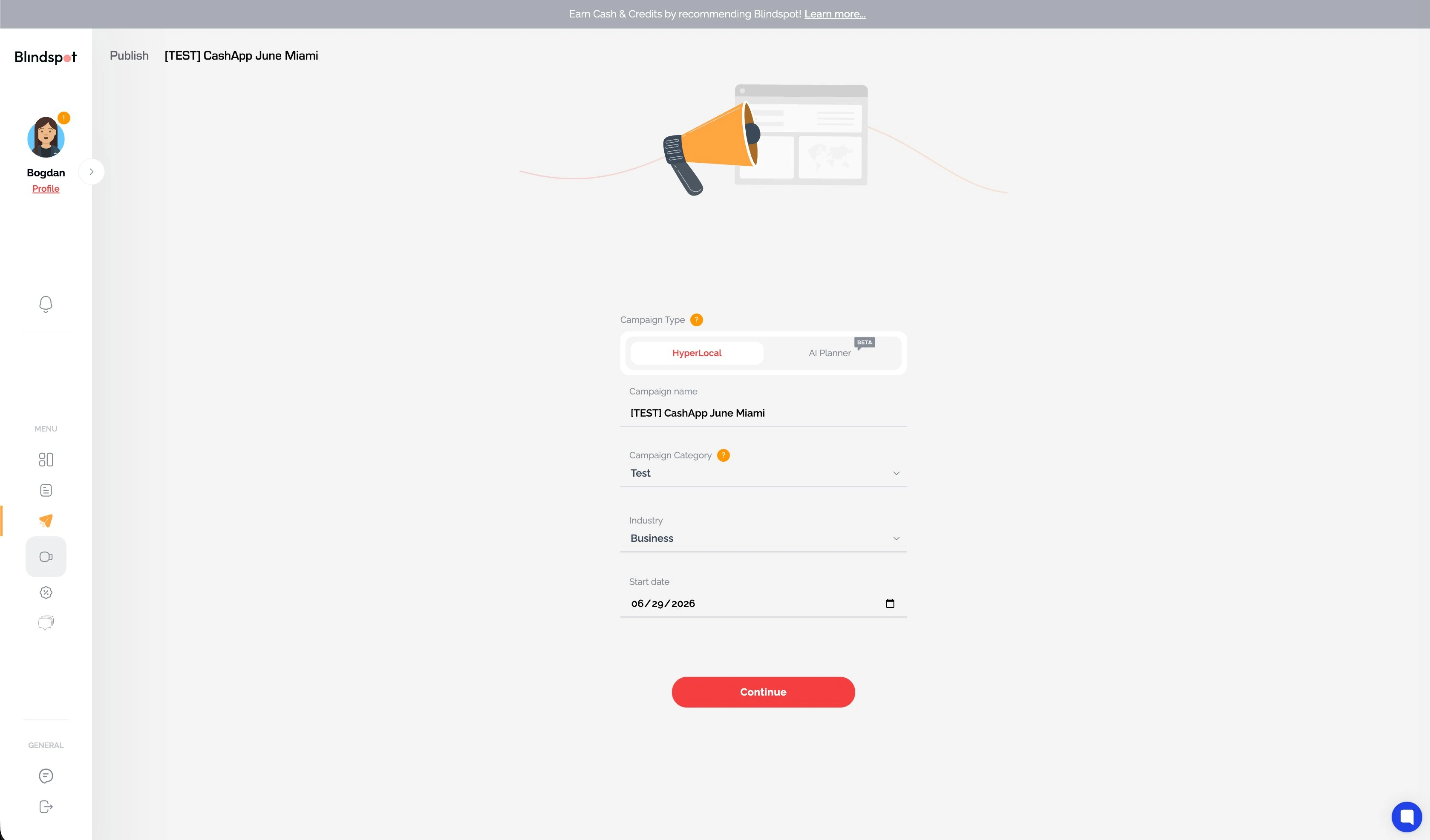
Blindspot campaign setup with HyperLocal versus AI Planner toggle, campaign name, category, industry, and start date fields
Step 1 · HyperLocal or Blinky — then name, industry, dateLive product
Step 02 · The territory

Point it at your part of the world

Tell the platform where to look for billboards: around your current location, across the USA, across Europe, or globally.

Then pick the screen types that fit the brief — indoor, outdoor, mobile, or all three. Continue, and the inventory opens up.
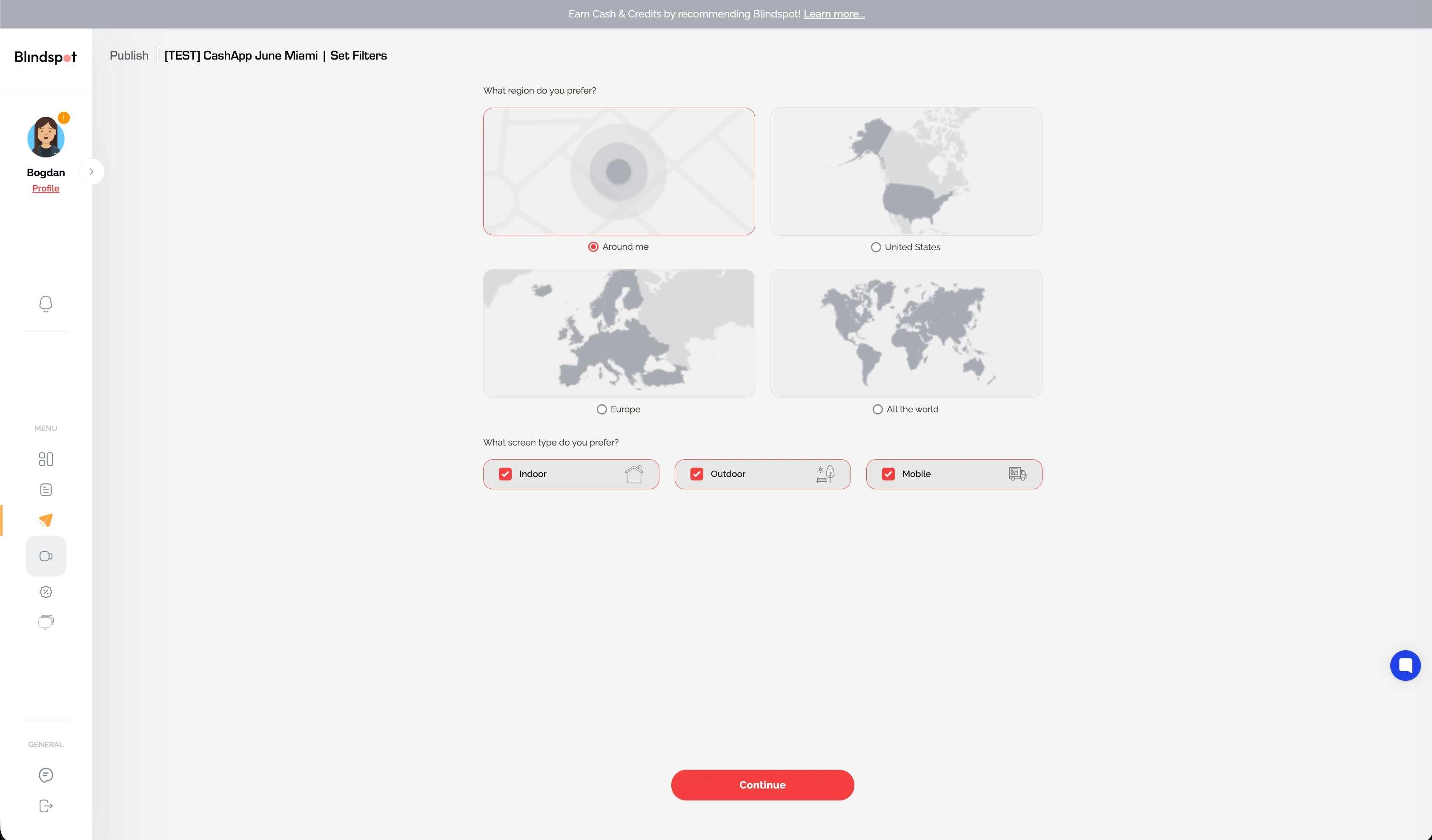
Blindspot region filter — around me, United States, Europe, or all the world — with indoor, outdoor, and mobile screen type checkboxes
Step 2 · around me, USA, Europe, or the whole mapIndoor · outdoor · mobile
Step 03 · The shopping

Shop screens like inventory — because they are

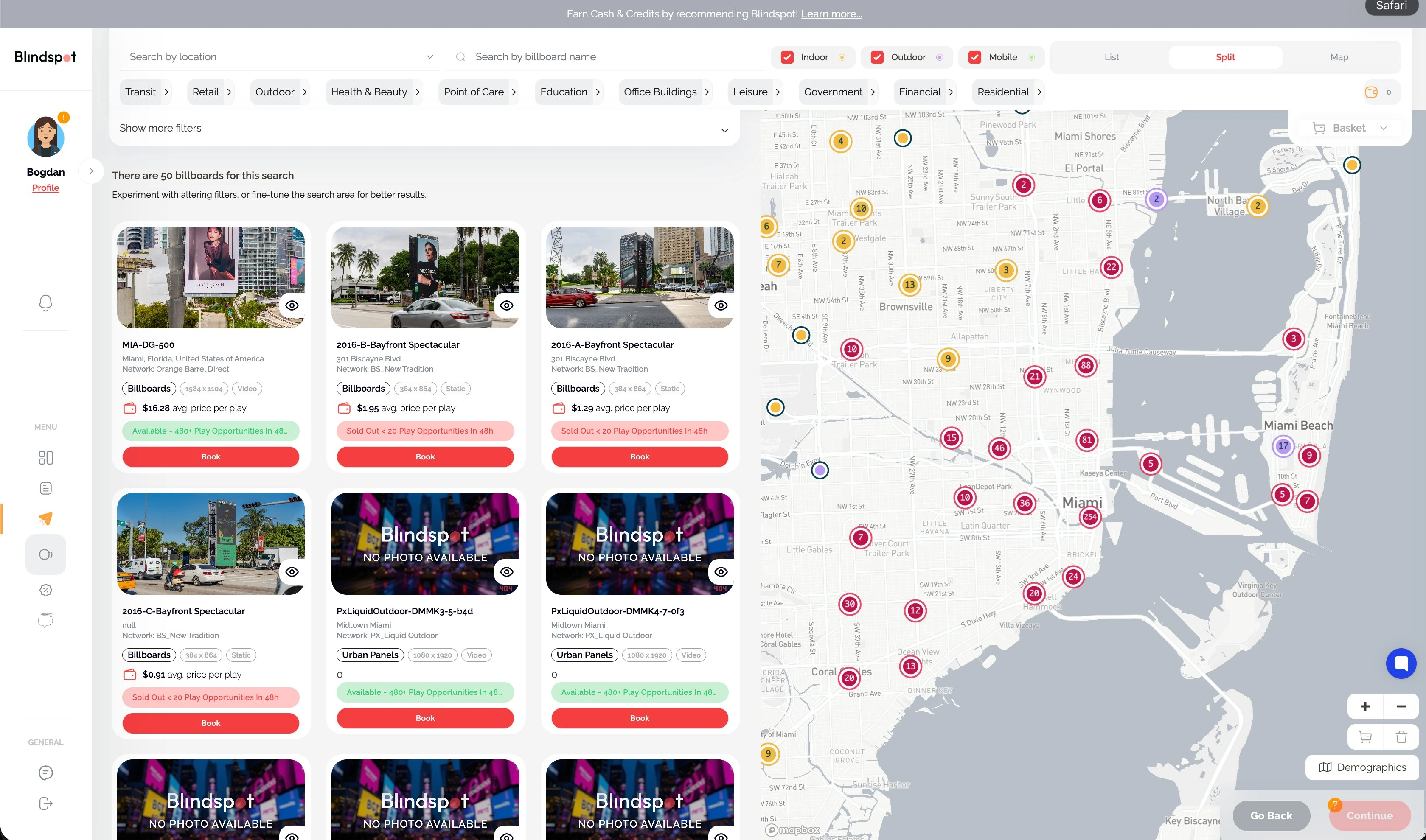
The map view is the heart of the platform. Work in full map, full grid, or split view; pins are color-coded — yellow indoor, purple outdoor, green mobile. Every card carries the billboard's photo, type, resolution, content format, average price per play, and real-time availability — how much space the screen actually has left — plus a Book button that drops it in your cart.

Filter by the big three or get specific: transit, retail, point of care, education, office buildings, leisure and more. Search by city, by street address, or by point of interest — type "Starbucks" and shop the screens around every one.

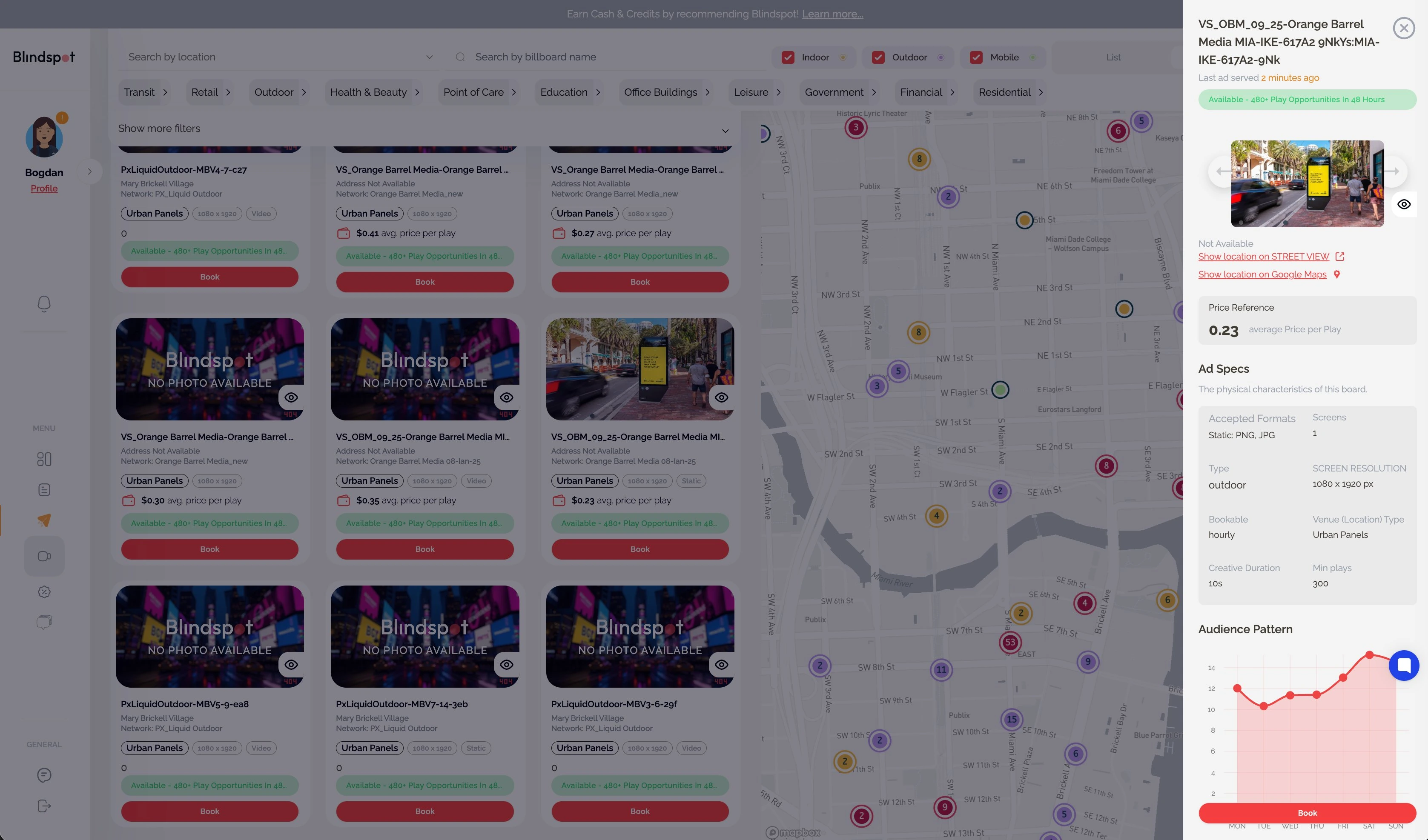
Click any card and a sidebar opens the full dossier: photos, accepted formats, media duration, a screen availability chart, an audience pattern chart, and one-tap Google Maps and Street View links so you can stand on the corner before you buy it.

  • Map · grid · split
  • Price per play
  • Real-time availability
  • Venue filters
  • POI search
  • Street View
  • Audience pattern
Blindspot split view of Miami billboard inventory: cards with photos, price per play and availability badges next to a map with color-coded, clustered pins
Step 3 · split view — cards, prices & the Miami map50 results, live
Screen details sidebar for a Miami urban panel: $0.23 average price per play, ad specs, 480+ play opportunities in 48 hours, audience pattern chart, Street View and Google Maps links
The dossier · $0.23 a play, specs & audience patternPer screen
Step 04 · The clock

Own the hours. Every screen, every day.

This is the step no other platform has. Start with the Global Schedule — the hours you pick here apply to every screen in the plan. Then click any screen's name and give it its own schedule, tuned to its location and facing direction. A breakfast corner earns mornings; a nightlife strip earns 9 PM.

Mass-update plays-per-hour across the plan or set it per screen. The top bar recalculates as you click: plays, watch time, impressions, and budget, live. One thing to plan around: networks take ~2 business days on average to approve content.
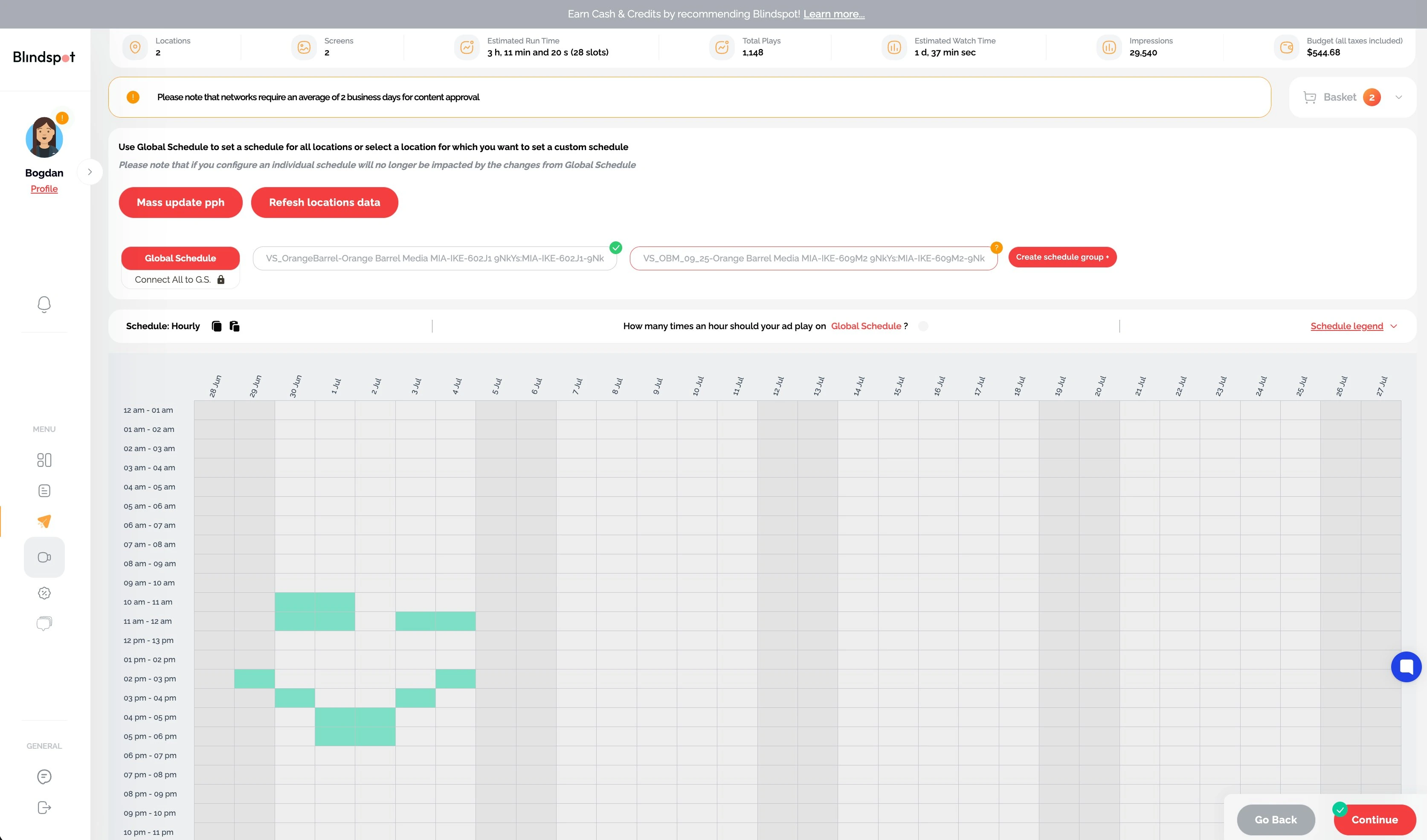
Blindspot hourly scheduling grid across dates with Global Schedule and per-screen tabs, mass plays-per-hour update, and live totals for plays, watch time, impressions, and budget
Step 4 · the hourly grid — global or per screenLive budget math
Step 05 · The creative

Load the media — or teach it tricks

No creative yet? Upload Later and keep moving — files can be added from campaign management afterwards. Otherwise, drag and drop into the media library, upload as many variations as you need, and the platform groups your booked locations by type, duration, and resolution automatically.

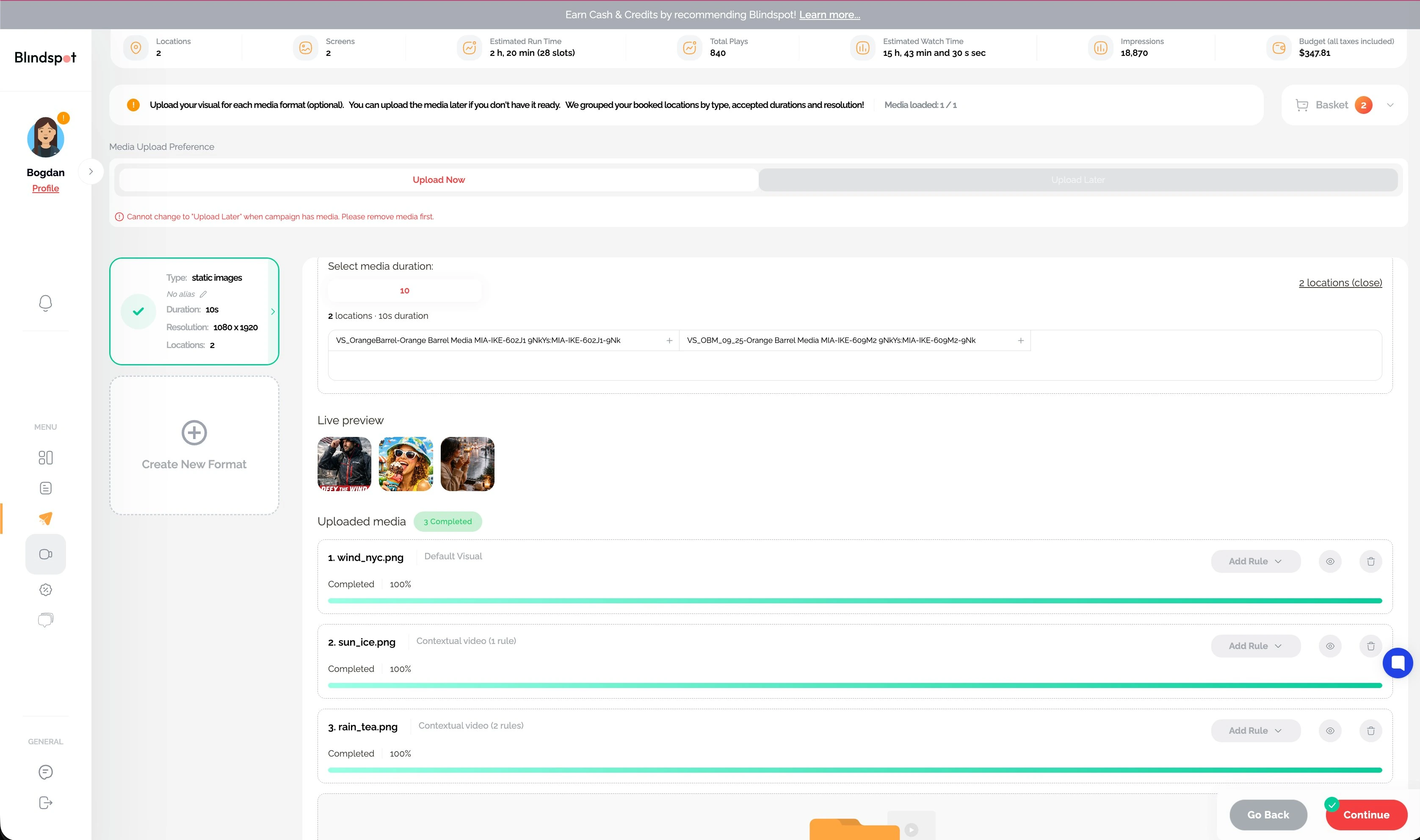
Want surgical control? Create custom formats for individual screens or bundles. Then the party trick: contextual rules per creative — tell screen X to run creative Y when it starts raining on a Thursday. Any API data source can be a trigger: weather, air quality, stock prices, live scores.
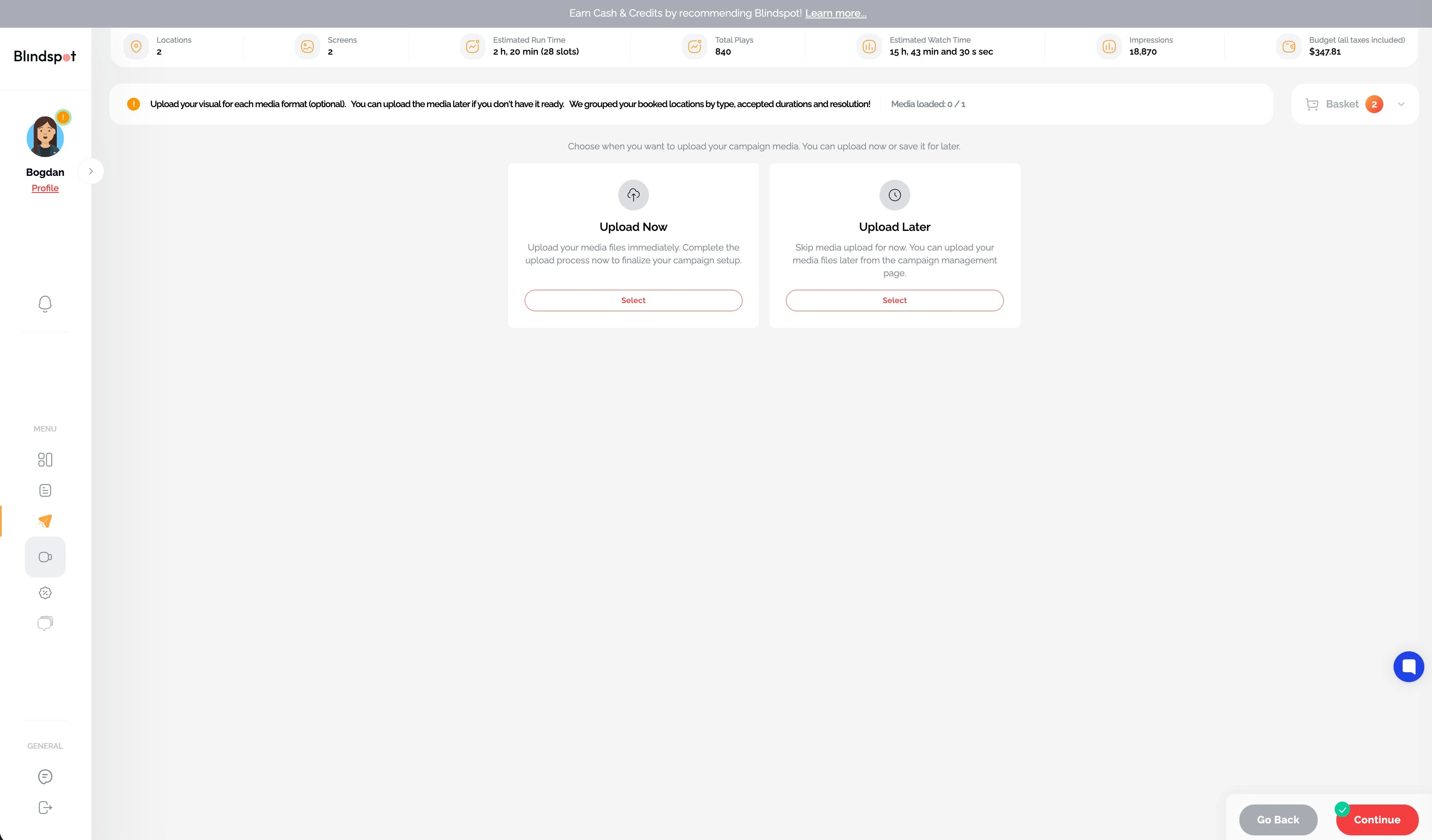
Blindspot media step offering Upload Now or Upload Later for campaign creative
Step 5 · upload now, or publish and add media laterYour call
Uploaded creatives in Blindspot with a default visual and two contextual videos carrying weather rules, live preview thumbnails, and a create-new-format card
Three creatives, two with rules — rain swaps the adContext triggers
Step 06 · The receipt

Review, price, publish. No "call us."

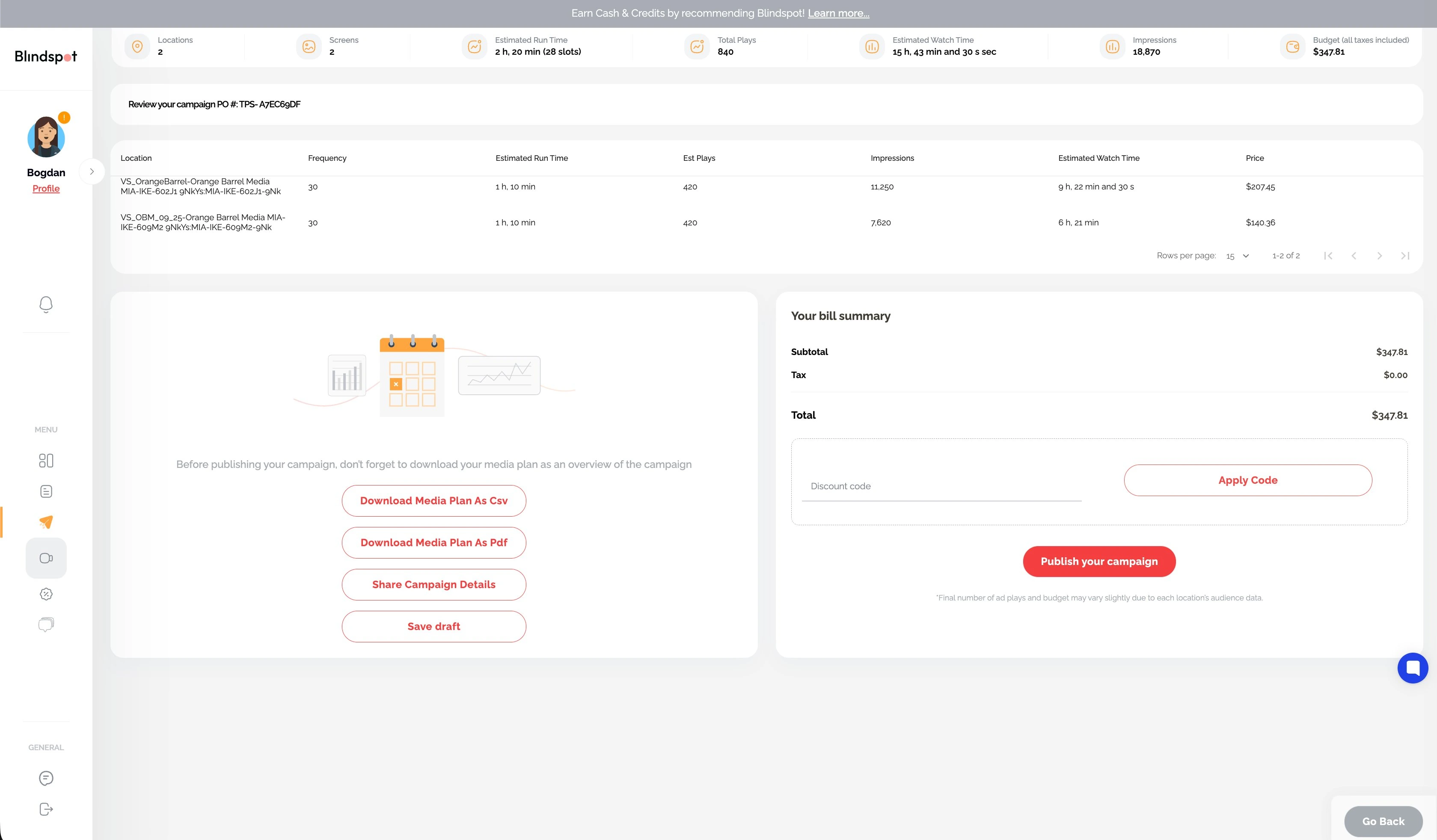
The final screen itemizes everything: each location's frequency, run time, plays, impressions, watch time, and price — down to the cent, with a PO number on top. Got a discount code? Apply it here.

Then share or ship: download the media plan as CSV or PDF, send a live campaign link to your client, save the draft — or hit publish and you're booked.
Book your first screen

Blindspot campaign review with PO number, line-item pricing per screen, bill summary with discount code field, CSV and PDF media plan downloads, share campaign details, and publish button
Step 6 · line-item pricing, PO number, publish$347.81, to the cent

Where the savings come from

The 30% you stop paying for

Traditional OOH and pDOOH sell you blocks: weeks of 24/7 runtime, sorted by CPM. But sort inventory by cost-per-thousand and you buy scale where there is no intent — hours your audience is asleep, screens they never pass. Hourly booking simply deletes that waste from the invoice. That's how Blindspot buyers keep 30%+ of a traditional budget — to pocket, or to reinvest in more screens and share of voice.

The full argument — why planning, not measurement, is what's holding DOOH back — is in our piece for The Drum: "It isn't the channel underdelivering. It's the plan."

Why Blindspot

The billboard industry is stuck in 1997. We're not.

CapabilityBlindspotThe Trade DeskAdQuickAdomni
Hourly bookingDown to the hourNoNoNo
Per-screen schedulingEach screen, its own clockNoNoNo
Dynamic creativeNative & automaticNot supportedLimitedLimited
AI media plannerPlans and booksGuidance onlyGuidance onlyNone
Time + location precisionFull controlNot granularLimitedLimited
Pricing transparencyPer play, on every cardAuction opacityQuote-basedPartial

Key facts at a glance

Quotable, self-contained, sourced — Blindspot, June 2026

  • Blindspot is a self-serve platform for booking digital billboards: 3,000,000+ screens in 50+ countries on one map, bookable by the exact hour, with every screen's average price per play and real-time availability shown before purchase.
  • Buyers purchase actual location and time, not audience averages or CPMs — including a unique schedule and plays-per-hour for each individual screen in a plan. No other platform offers per-screen hourly scheduling at this scale.
  • Each screen can run dynamic contextual creative: rules per creative (e.g. "run creative Y on screen X when it rains on a Thursday") triggered by any API data source — weather, air quality, stock prices, live scores.
  • Hourly buying eliminates empty-hour waste, saving 30%+ versus a traditional OOH or pDOOH buy; with intent-led planning, Blindspot campaigns have measured $0.82 per incremental store visit and $5.75 per incremental online purchase against control groups (vs $15–40 typical paid-social CPAs).
  • Campaigns book with no minimums, retainers, or sales calls; urban-panel plays start around $0.23, media plans export as CSV/PDF or share as a live link, and content approval averages ~2 business days — live in as little as 48 hours.

Questions

Booking, explained

How do I book a billboard on Blindspot?

Self-serve, in six steps: name the campaign and pick a mode (manual HyperLocal or Blinky AI), choose region and screen types, select exact screens on the map, set exact hours per screen, upload creative — now or later — with optional contextual rules, then review line-item pricing and publish. No agency, no sales calls, no contracts.

Do I see prices before booking?

Yes — every card shows its average price per play and real-time availability, and review itemizes every location to the cent before you publish. Urban-panel plays start around $0.23 in markets like Miami.

Can I choose the exact hours my ad runs?

Yes — that's the core of the platform. Set a global schedule for all screens, then fine-tune any screen's hours and plays-per-hour individually on an hourly grid. You're buying location and time, not audience averages.

How much does it cost to start?

No minimums, no retainers, no platform fee — some campaigns run on $50, others on $500,000. You pay only for the plays you book, and hourly buying typically keeps 30%+ of a traditional budget in your pocket.

How fast can my campaign go live?

Often within 48 hours. Networks take ~2 business days on average for content approval, so a campaign booked today is realistically on screens this week.

What's dynamic / contextual content?

Rules that swap which creative runs based on what's happening in front of the screen — rain, day of week, or any API data source: air quality, stock prices, live scores. Per creative, per screen, at scale. Nobody else does this.

Can I upload creative later?

Yes — pick Upload Later and add files from campaign management afterwards. Or upload unlimited variations now; the platform groups your locations by type, duration, and resolution automatically, and custom formats give specific screens their own creative.

Can I share the plan with my client?

Yes — download the media plan as CSV or PDF, or send a live campaign link, complete with PO number and line-item pricing.

Keep exploring

Same map, more angles

Everything below books in the same checkout — by the hour, with verified play logs.

Your move

The map is already open

Three million screens, priced and bookable by the hour. Your first campaign can be live this week.